Construct Viewer
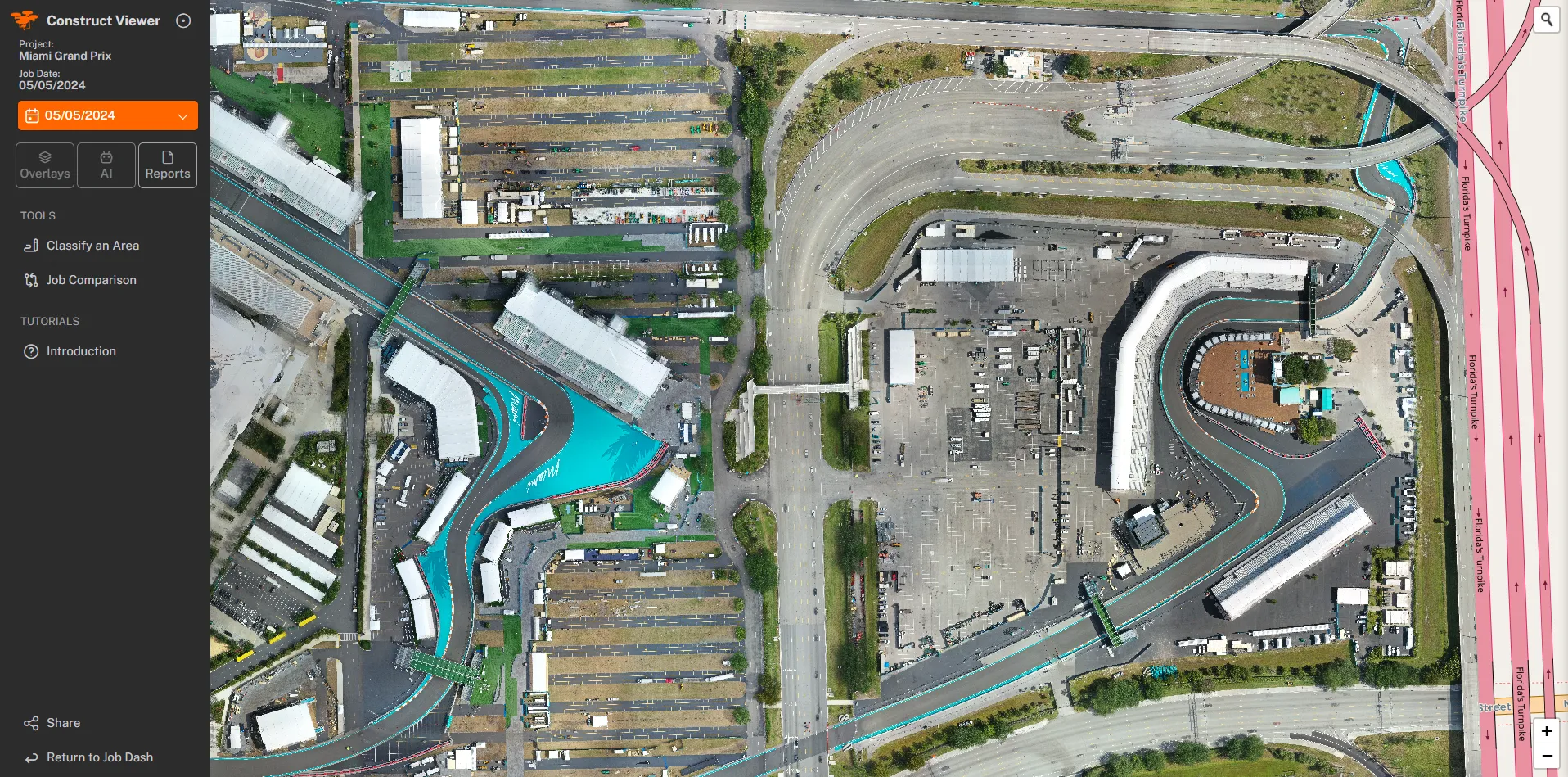
Every drone flight over your site becomes a dated, zoomable aerial you can scrub back through. Compare any two dates side by side, measure distances and areas, and pull a branded report for the owner in a couple of clicks.
KEY FEATURES
What Construct Viewer gives you
A dated flight history
Every capture lands on a timeline. Jump to the pour, the dry-in, or last Tuesday, and the site loads exactly as it looked that day.
Job comparison
Drag a slider between any two flights to show what moved. We flew this on the Miami Grand Prix build at Hard Rock Stadium, and Pulte runs it across their communities.
Overlays and classification
Drop the site plan over the aerial, mark phases, and tag what is complete so the whole team reads the same picture.
Owner-ready reports
Export a branded PDF with dated aerial images, annotated notes, and GPS coordinates. The owner, lender, or field team opens it in any browser, no login, no app, no special software.
Built for these buyers
HOW IT WORKS
One flight, then a living record
We fly
A certified pilot captures the whole site on a repeatable flight path, so every visit lines up with the last.
We process
The images stitch into a dated aerial and land on your project timeline, usually within 2-4 business days.
You review
Log in, compare dates, measure, and share a report with the owner, the lender, or the field team.
Construct Viewer is the deliverable behind our progress work. The flights are the same ones we run for monthly documentation, so a site already on a photo cadence can move up to the Viewer without changing anything on the ground.
The problem
Construction projects run on timelines that shift daily. A foundation pour happens on Tuesday, framing starts the following week, and by the time the owner meeting rolls around, the site looks different from the last update.
Traditional progress photos, taken from the ground, organized in folders, and emailed as attachments, miss that shift. They capture moments, not progress.
What the Viewer does
The Construct Viewer turns every drone flight into a dated, zoomable aerial on a timeline:
- Compare any two dates side by side to show what moved
- Measure distances and areas directly on the map
- Overlay the site plan to show which phases are complete
- One link: the superintendent, the owner, and the lender all read the same picture
Why it matters
- Saves time on owner meetings by replacing slide decks with a live site record
- Saves money by catching disputes early, when an excavation error shows up in week three, not after the slab is poured
- Improves labor coordination by giving the field team a single source of truth they can check from their phones
We flew the Miami Grand Prix build at Hard Rock Stadium and Pulte runs it across their communities. The Viewer works alongside the drone and makes the flight useful long after the pilot lands.