Inspection Viewer
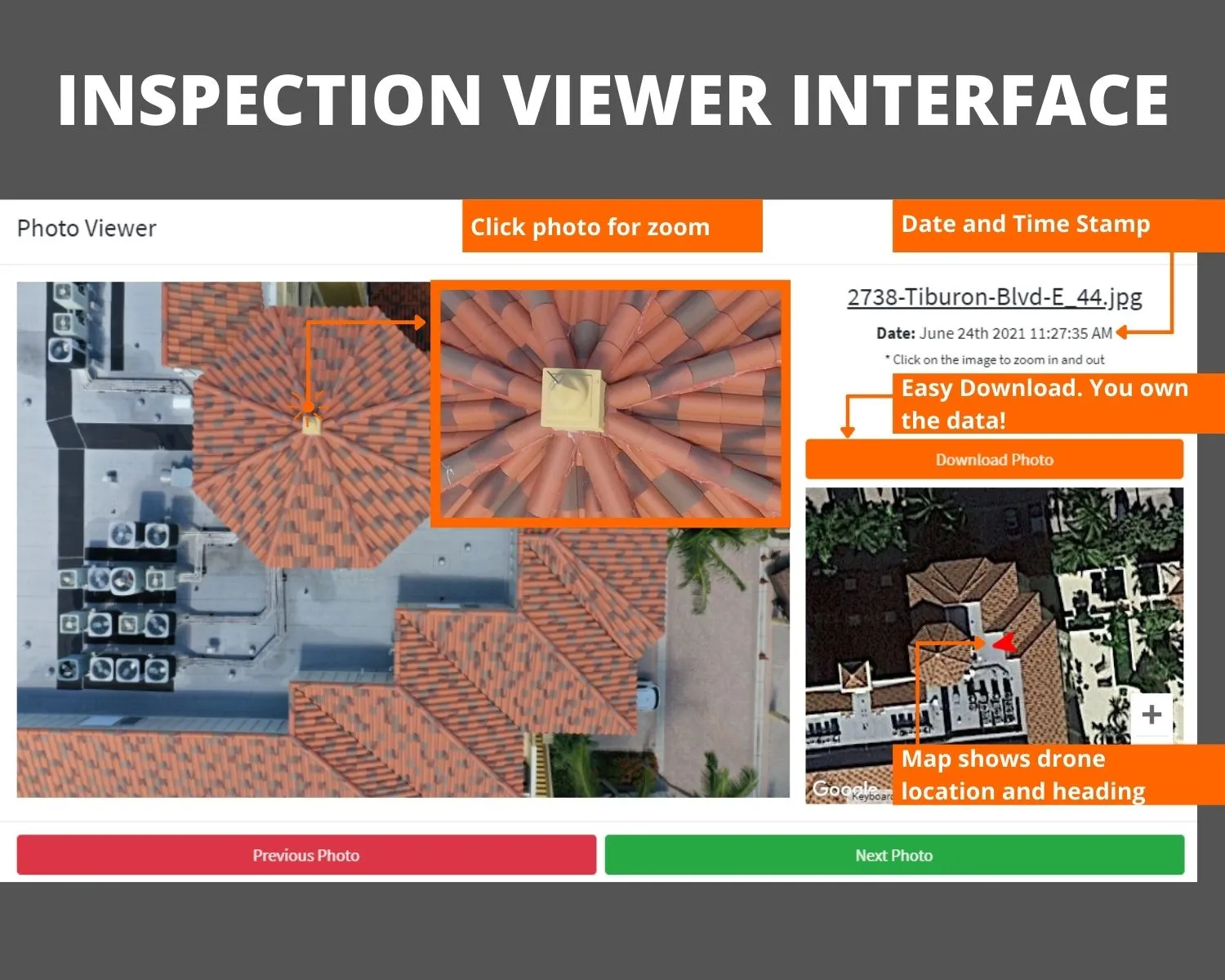
Annotated roof and structure inspections your adjuster or owner can actually use. Every photo is date and time stamped, mapped to where the drone was standing, and one click from a full-resolution download.
KEY FEATURES
What Inspection Viewer gives you
Annotated defects
Callouts sit right on the photo: cracked tile, lifted shingles, failed flashing, each with a note the reader understands.
Date, time, and location stamped
Every frame carries when it was taken and where the drone captured it. That is what adjusters ask for on a claim.
One-click report export
Zoom into any photo, download it at full resolution, or export the entire inspection as a branded PDF with timestamped images and GPS coordinates, ready for insurance submission.
Industrial and heavy-industry sites
Plants, refineries, and heavy industrial facilities documented with the same annotated, dated aerial report, reducing time on the ground in active work zones.
HOW IT WORKS
One flight, then a living record
We fly the structure
A pilot captures the roof or elevation in a grid, close enough to read the material condition.
We annotate
We mark the defects that matter and stamp each photo with the date, time, and drone position. Processing takes 2-4 days from flight to delivery.
You send it
Share one link with the adjuster, owner, or board. They open, zoom, and download, no login required.
Inspection Viewer is where our inspection flights land. For a claim, the value is in the record: dated, located photos that hold up when an adjuster reviews them months later.
The problem
When a homeowner files a roof claim, the adjuster needs proof, beyond “there is damage”: when it was documented, where on the roof it sits, and what it looks like at full resolution. A ground-level photo from a ladder cannot show all of that. A drone can, and the Inspection Viewer is where that evidence lives.
What the Viewer does
Every photo carries a date stamp, a time stamp, and the GPS coordinates of where the drone was when it captured the image:
- Annotated callouts sit directly on the photo, cracked tile, lifted shingles, failed flashing, each with a note the adjuster can read without a site visit
- Data prevents arguments: the record is dated, located, and timestamped
- One-click export: zoom, download at full resolution, or export the entire inspection as a branded PDF ready for insurance submission
Four types of inspections
- Residential roofing: homeowners and contractors
- High-rise facade: Florida associations under SB 4-D
- Multi-family property: property managers
- Heavy-industry facilities: plants and refineries that need to reduce time on the ground in active work zones
The adjuster, the owner, or the board opens one link. No login, no app, no special software. High quality resolution to see details.